Where your team’s AI work goes live.
Any AI builds the dashboard, portal or manual. ShareOut gives it a link, review and versions, and keeps it working.
- 1 AskAnyone asks an agent for what they need.
- 2 It goes liveThe agent publishes it to your workspace.
- 3 People review itTeammates and clients comment and approve.
- 4 It keeps workingNew versions and approvals reach the right people.

 Claude
 ChatGPT
 Gemini
 Telegram
Things you didn't know a link could do
Real artifacts, running live right here. Slide through them, filter, flip a slide, edit a cell. None of it is a screenshot.
Work used to be dead files.
Now it's one living workspace.
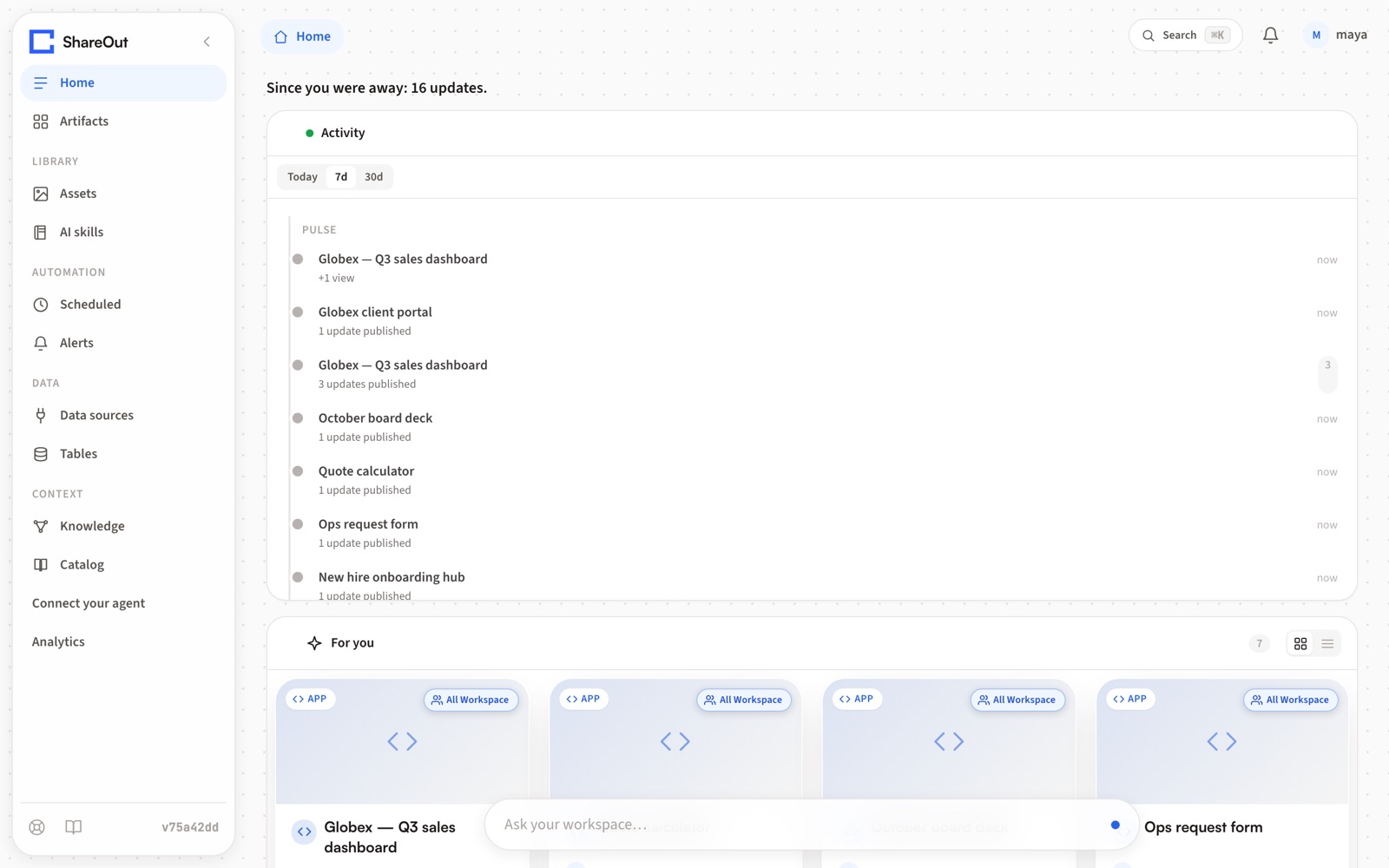
Good work gets sent once and forgotten: in a chat, a PDF, a Slack thread. ShareOut turns each piece into a live, connected artifact that your team, your agents and your clients keep working on.



 partner
  partner




What teams keep in ShareOut.
Every team keeps things that should be a live link instead of a file. Here’s what one fictional studio, Acme, keeps in ShareOut.
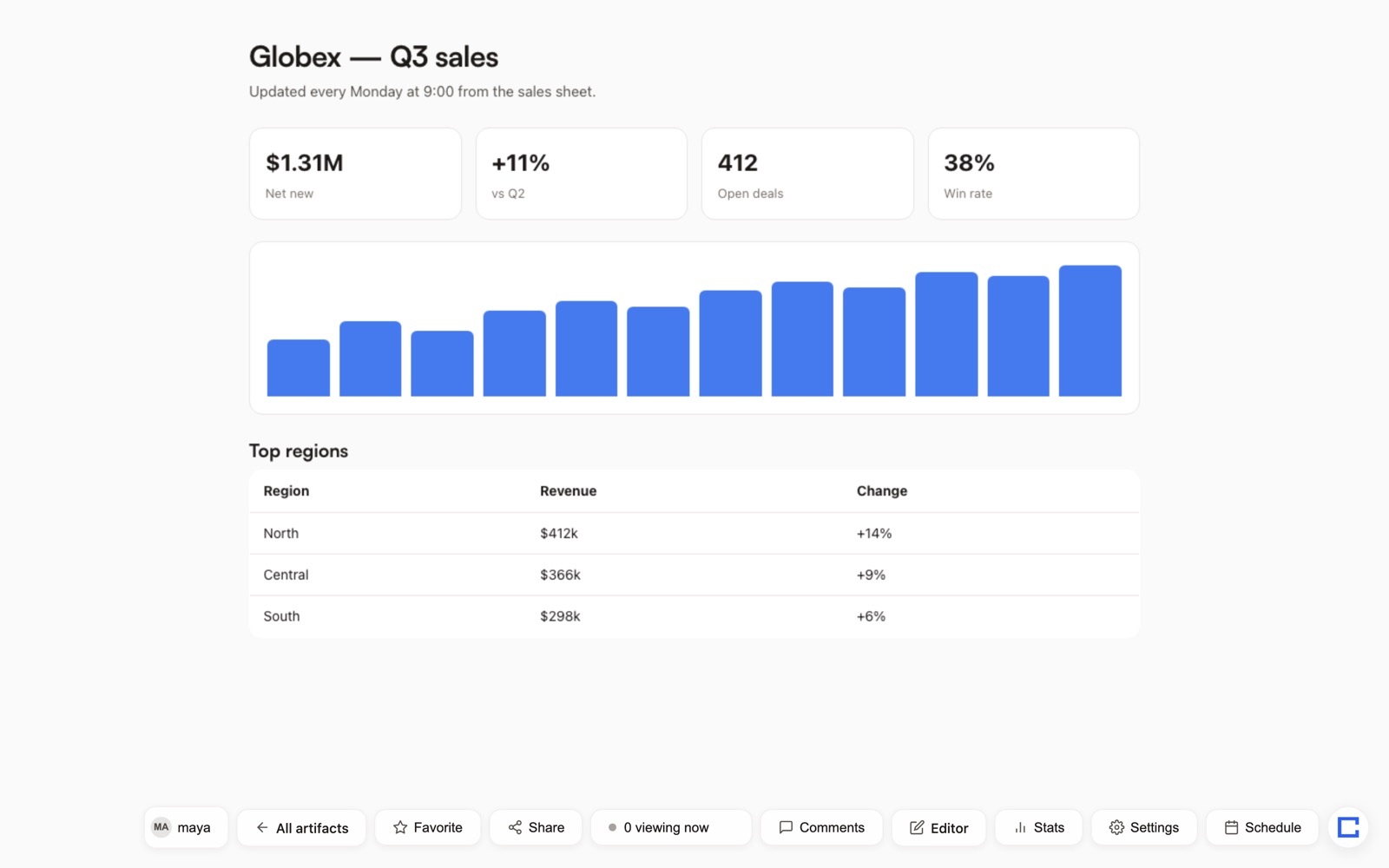 Sales dashboard Globex’s Q3 numbers, refreshed every Monday from the sales sheet.
 Acme and Globex are fictional. Screenshots are from a local ShareOut instance with sample data.
Everything can be a trigger.
Artifacts don’t wait to be opened. Pick when, pick what, and ShareOut runs it, with a log of every run.
When…
- A schedule comes around: every morning, every Monday
- A new version is published
- Someone opens the artifact
- Someone comments
- A version is approved
- Someone outside opens a shared folder for the first time
- An email arrives at the artifact’s own address
- A number on a dashboard crosses a threshold
…ShareOut can
- Email people
- Post to Slack, Telegram or Discord
- Notify the owner and followers
- Refresh the artifact’s data
- Append rows to a Google Sheet
- Call a webhook
- Run a crew: an agent that queries, summarizes and delivers
Approvals and first opens send notifications; the rest can start any job. Members-only artifacts can also read live from your workspace’s MCP servers, with each viewer’s own account (see below).
One workspace, everything wired together
Data flows in. Artifacts read each other. Crews and schedules keep it alive. Results flow out.
Describe the job. A crew runs it — forever.
Not a one-off page. A crew that plans the work, connects your data, runs on a schedule, and delivers the result — on its own, every time.
On it — connecting Snowflake and checking last week's trend.
- 1Connect Snowflake · pull last week's sales
- 2Compute WoW deltas, flag the risks
- 3Write a plain-language summary
- 4Schedule it every Monday 9:00
- 5Deliver to Slack #revenue
- Querying Snowflake…12,480 rows
- Computing deltas+14% WoW
- Summarizing3 wins · 1 risk
| Region | Revenue | Δ |
|---|---|---|
| AMER | $612k | +18% |
| EMEA | $284k | −6% |
| APAC | $174k | +9% |

Revenue +14% WoW — $1.07M booked. Wins: enterprise expansion, faster onboarding. Risk: EMEA pipeline slipping. Full dashboard ↗
Why not just share it from the chat?
Keep building in Claude or ChatGPT. ShareOut is where the result lives once a team, a client or a schedule depends on it.
| Feature | Pages inside an AI chat app | ShareOut |
|---|---|---|
| Who can publish | Pages inside an AI chat appThat app’s own assistant | ShareOutClaude, ChatGPT and other MCP clients, the CLI, the API, Telegram or the ShareOut Agent |
| Where it lives | Pages inside an AI chat appIn the chat app, next to your conversations | ShareOutIn your workspace, next to your files, data and other artifacts |
| Team permissions and folders | Pages inside an AI chat appOrg, people or link sharing on team plans; varies by app | ShareOutRoles, folders, an access pill that shows the real audience, expiring access |
| Files, data and knowledge | Pages inside an AI chat appEach viewer’s own app connectors | ShareOutWorkspace connections and files, each member’s own MCP accounts on members-only artifacts, plus Knowledge that cites the section |
| Triggers and actions | Pages inside an AI chat appSome apps add scheduled automations | ShareOutSchedules and events: views, comments, new versions, inbound email, metric alerts |
| Versions and review | Pages inside an AI chat appSaved versions and comment roles vary by app | ShareOutDiffs, restore, pins, assign, approve, comments tied to a version |
| Clients | Pages inside an AI chat appPrivate viewers usually sign in to that app | ShareOutClient portals; guests comment after an email code, no account |
| Where it runs | Pages inside an AI chat appThe vendor’s cloud | ShareOutShareOut Cloud, or self-hosted on your Cloudflare account |
| Leaving | Pages inside an AI chat appExport options vary by app | ShareOutArtifacts are plain HTML; the code is Apache-2.0 |
Based on the public help pages for Claude artifacts, ChatGPT Sites and Notion Sites as of October 16, 2026. They change often, so check the vendor’s docs: Claude · ChatGPT Sites · Notion. Trademarks belong to their owners; ShareOut isn’t affiliated with them.
Ask from wherever you already are.
The same agent and the same workspace, on the web, on Telegram and inside the AI apps your team uses.
-
On the web
The ShareOut Agent lives in every workspace. Ask about your artifacts, find a passage, list versions and comments. It asks before it restores, approves or resolves anything.
-
On Telegram
Link your account to @ShareOutAI_bot, then ask by text or voice. Replies come with links that open the exact artifact, page and section, and an Open button for one-tap sign-in. Actions still need your confirmation.
-
In Claude, ChatGPT and other MCP clients
Add one connector link, sign in, and your agent can publish, update, restore, review, share and search Knowledge: about 35 tools.
# Claude or ChatGPT: add a custom connector
https://shareout.site/mcp

# any other agent: read the skill
GET https://shareout.site/v1/skill

# Telegram
@ShareOutAI_bot
Knowledge that cites the paragraph.
The workspace learns the documents you publish and upload: HTML artifacts, PDFs and Office files, legacy Word .doc included. Ask a question and the answer names the exact artifact, page and section, with a link that opens on that paragraph.
How Knowledge works →Where do we cover refunds for annual plans?
Annual plans are refunded pro rata within 30 days of renewal.
Client handbook › Billing › RefundsClient portals and review, in the same place.
Send a client one link to a branded folder. Get their feedback on the artifact itself, not in an email thread.
Client portals
- Turn a shared folder into a branded portal your client opens with one link
- The access pill shows who can really see it, and you can manage people from it
- Give access that expires on its own
- See who opened what, and get a notice the first time someone outside opens it
Review
- Place pins right on the artifact
- Resolve, assign and approve a version
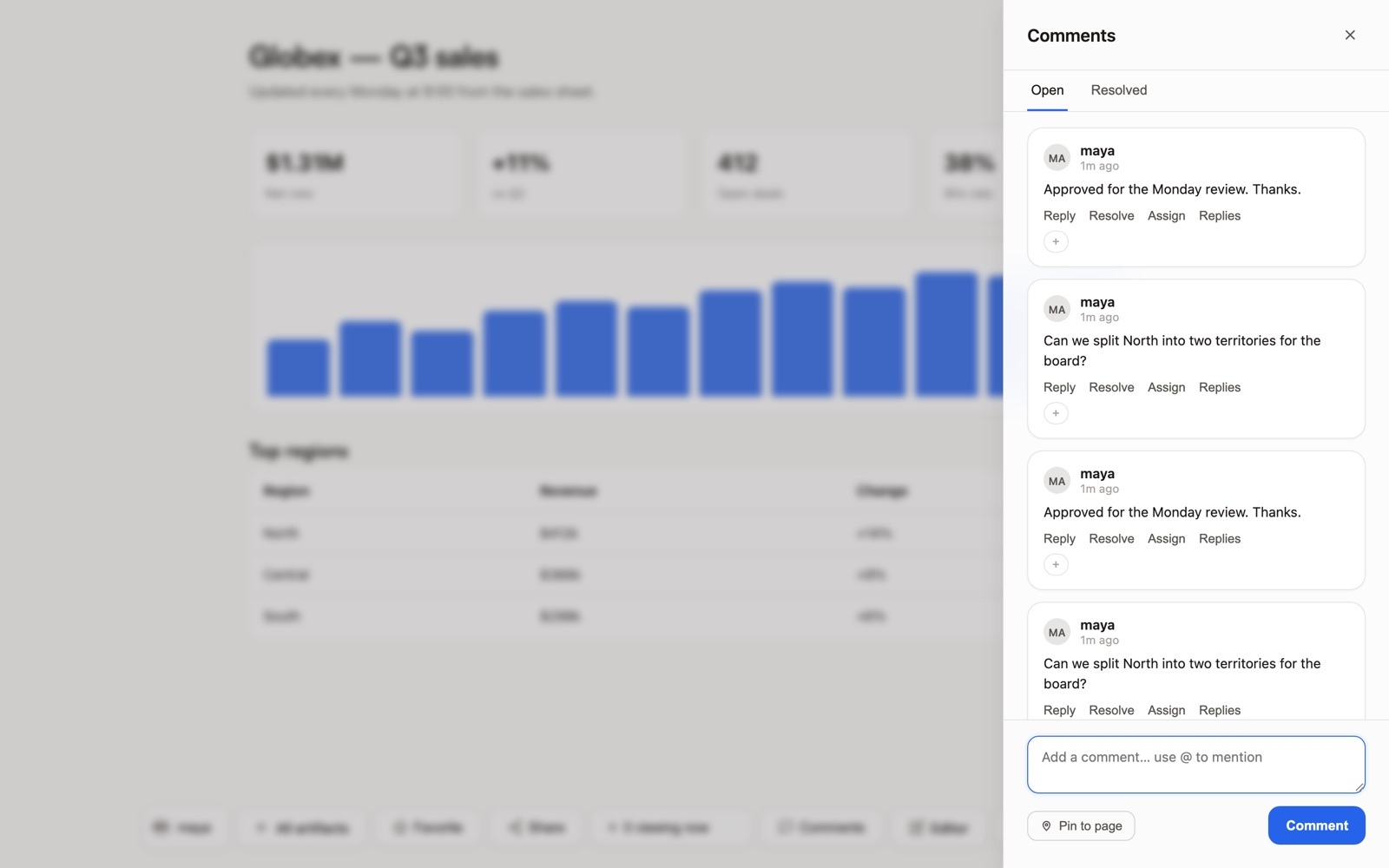
- Comments stay anchored to the version they were written on
- Guests without an account comment after confirming an email code, when the owner turns it on
Build your internal BI on it.
Connect Snowflake, BigQuery, Sheets, Analytics or Shopify with your own keys. Publish them as datasets every artifact and agent can read, catalog them with lineage, and let scheduled crews keep the numbers true. The dashboard you share today is still right next quarter.
See the data platform →Edit in the browser. Or let the AI do it.
Click a block and change it, like a doc. Or describe the change and watch it happen. The page on the left is real — edit a cell and the totals and the chart recompute, right now.
See the editor →One product, two ways to use it.
The same open-source code runs ShareOut Cloud and every self-hosted instance. Start on ours, or run your own.
ShareOut Cloud
Sign in at shareout.site and publish right away. No infrastructure to run, and the managed extras are already on.
- The ShareOut Agent and Knowledge, ready to use
- @ShareOutAI_bot on Telegram, already set up
- Updates shipped for you
Open source, self-hosted
Deploy the public repo on your own Cloudflare account. Your domain, your data, your code to fork and rebrand.
- Deploy button, CLI, or an agent deploy skill
- Every feature in the code is on: no plans or seats
- Runs on Workers, D1, R2 and Durable Objects
Claude and Artifacts are trademarks of Anthropic. ChatGPT and ChatGPT Sites are trademarks of OpenAI. Notion is a trademark of Notion Labs. ShareOut is an independent project and is not affiliated with, endorsed by, or sponsored by any of them.
Everything an artifact needs after it’s published.
An agent publishes it. Then people share it, review it, change it and come back to it.
Agents publish live pages
The MCP connector gives an agent about 35 tools: publish and update (including multi-page sites), versions and restore, comments and review, sharing, jobs and Knowledge. The CLI, the API and the skill cover the rest.
Folders that share like links
A shareable folder link, an access pill that shows who can really see it, people you can manage, access that expires, and a log of who opened what.
Docs →Version history
Every version with who made it and how. Line diffs, preview, a restore that never deletes anything, and AI notes on what changed.
Docs →Review and comments
Place a pin on the artifact. Resolve, assign, approve. Each comment stays tied to the version it was written on.
Docs →Multi-page sites
Publish a whole site in one call. A link can open a specific page, and a specific section on it.
Notifications that matter
When a version is approved, when someone outside opens a shared folder for the first time, when a new version lands. In the feed, by email and on Telegram.
Fast, with guard rails
The workspace home went from a 1.4 MB document to 75 KB. Rate limits on sign-in codes and guest comments, and on Cloud at the edge too. Private by default.
Live data from each viewer’s own accounts.
A members-only artifact can read from the remote MCP servers your workspace adds. Everyone who opens it sees their own data, through their own sign-in.
How it works
- A workspace admin adds an MCP server by its URL, once
- Each member connects their own account with that server’s sign-in
- The artifact declares the exact tools it reads when it’s published
- The first time, each viewer allows it in ShareOut’s own dialog
What keeps it safe
- Only for members of the workspace: public links, password links and guests never reach it
- Only tools the server marks read-only
- The artifact never sees anyone’s token
- A changed declaration asks every viewer again, and allow and revoke go to the audit log
Open source or Cloud?
Same product, same code. The difference is who runs it.
| Feature | Open source | ShareOut Cloud |
|---|---|---|
| Who runs it | Open sourceYou, on your own Cloudflare account | ShareOut CloudWe do, at shareout.site |
| Getting started | Open sourceDeploy button or CLI, then claim the first admin at /setup | ShareOut CloudSign in with an email code |
| Updates | Open sourceYou pull from GitHub and redeploy when you choose | ShareOut CloudWe ship updates to the instance |
| Where data lives | Open sourceYour Cloudflare account (D1, R2), under your domain | ShareOut CloudOur Cloudflare account, on Cloudflare’s network |
| Agent and Knowledge | Open sourceIncluded in the code; add your own AI provider key | ShareOut CloudReady to use, operated by us |
| Telegram | Open sourceConnect your own bot token | ShareOut Cloud@ShareOutAI_bot, already set up |
| MCP connector | Open sourceyour-domain/mcp | ShareOut Cloudshareout.site/mcp |
| Support | Open sourceGitHub issues, best effort | ShareOut CloudEmail and in-product help reports, no SLA |
| Price | Open sourceFree (Apache-2.0). You pay Cloudflare for Workers Paid | ShareOut CloudNot published yet. Contact us |
| Self-host (open source) | Start on ShareOut Cloud |
Cloud pricing isn’t published yet. To talk about it, or to ask for a Cloud invitation, write to hello@shareout.site.
Self-host it in three steps
Deploy it on your own Cloudflare account and you own the whole workspace: data, domain, roster and code.
- 1
Deploy the Worker
One click provisions D1, R2, KV and Durable Objects in your account. Or clone the repo and run
npm run deploy, or hand an agent the deploy skill. - 2
Claim the first admin
Set
SESSION_SECRETand your public URL, open/setup, and sign in with an email code. Google sign-in is optional. - 3
Point an agent at it
Add
your-domain/mcpas a connector in Claude or ChatGPT, or give any agent the skill URL, and it starts publishing into your workspace.
git clone https://github.com/getshareout/shareout.git
cd shareout/shareout-app
npm ci
npm run db:migrate
npm run dev # http://localhost:55162 Questions, answered
What is ShareOut?
ShareOut is an open-source workspace where agents publish live pages: dashboards, docs, decks and multi-page sites, each with a link, version history, comments and review. Use it on ShareOut Cloud at shareout.site, or self-host the same code on your own Cloudflare account.
What does it cost?
The open-source code is free (Apache-2.0): you self-host it on your own Cloudflare account and pay Cloudflare for Workers Paid, which Durable Objects need. ShareOut Cloud pricing is not published yet; email hello@shareout.site to talk about it.
How do I get it running?
Click Deploy to Cloudflare (deploy command must be npm run deploy), open /setup, and create the first admin with email + password. Or follow the install guide on docs.shareout.site. Most deploys are live in under ten minutes. Locally: git clone, npm ci, npm run db:migrate, npm run dev.
What do I need to run it?
A Cloudflare account with Workers Paid, and Node 24+ for CLI deploy. ShareOut runs on Workers with D1, R2, and Durable Objects — no servers, no Docker, no database to operate. Google sign-in and email delivery are optional; password admin works without either.
Is my data private?
Artifacts are private by default, you control visibility per artifact and per folder, and workspaces have roles, publish approvals, expiring access and a log of who opened what. Self-hosted, everything stays on your own Cloudflare account, under your domain. On ShareOut Cloud, the instance runs on Cloudflare and we operate it.
Can it connect to my real data?
ShareOut connects to Google Sheets, Shopify, your warehouse (Snowflake, BigQuery), and any REST API using your credentials. Pages read live from the source, so a dashboard you share today shows the right numbers next week without re-exporting. Members-only artifacts can also read from remote MCP servers your workspace adds, with each viewer’s own account, once that viewer allows it.
Does it work for agents and automation?
Yes. Claude, ChatGPT and other MCP clients connect with one link (your instance address plus /mcp) and get tools to publish, update, restore versions, review comments, share and search Knowledge. Any agent can also use the skill at /v1/skill, the API or the CLI. Crews query data, summarize and deliver to Slack, Telegram or email on a schedule.
What can I build with it?
Dashboards, live presentation decks, spreadsheets, forms, wikis, client reports, internal tools, invoices, and data explorations — each a real interactive web page, not a screenshot or a static export. Anything you would normally split across a BI tool, a slide maker, a form builder, and a doc, you build and share as a single live link.
How is this different from Claude Artifacts, ChatGPT Sites, or Notion pages?
The idea is the same — describe what you want, get a real page you can send. The difference is where it lives and who controls it. Those run on the vendor’s servers, on their paid plans, with their limits on sharing and data access. ShareOut is Apache-2.0: self-host it on your own Cloudflare account so pages and data stay on your infrastructure, or use ShareOut Cloud. Sharing is governed per artifact, and the code is yours to fork and rebrand. It also does things a chat artifact does not: live data connections with your credentials, scheduled crews that refresh and deliver work, realtime multiplayer editing, and inline comments. ShareOut is an independent project, not affiliated with Anthropic, OpenAI, or Notion Labs.
Can I rebrand it or change the design?
Yes. The design system ships in the repo under Design/ with its tokens in one package — change the values and the whole app and every published page follow. The docs site is a plain Astro project you can edit, retheme, or delete. It is your instance.
How do I contribute or report a bug?
Open an issue or a pull request on GitHub. CONTRIBUTING.md covers local setup and the checks CI runs; security issues go through GitHub private vulnerability reporting rather than a public issue.
Everything here is a ShareOut artifact.
Including this page.
Every dashboard you filtered, every slide you flipped, every example you played with — real, live ShareOut artifacts. You weren't watching a demo. You were using ShareOut.
Start on Cloud.
Or own the code.
Apache-2.0 · docs.shareout.site · github.com/getshareout/shareout